![Symbol_transparent_black.png]](https://help.takeup.ai/hs-fs/hubfs/Symbol_transparent_black.png?height=50&name=Symbol_transparent_black.png)
Search Volume shows how many travelers are actively searching for stays through your property’s booking engine—either for specific future stay dates or on specific calendar days. It's one of your property's Key KPIs, and can be found on your TakeUp Web App Dashboard.
It provides an early view of demand before reservations are made, helping you understand interest levels sooner and make pricing decisions with more context.
By seeing how guest interest is trending ahead of bookings, Search Volume helps you stay informed rather than reacting after pickup has already shifted.
Where the Data Comes From
Search Volume data comes directly from your property’s booking engine.
This means:
-
The data reflects real guest intent on your own website
-
It does not include search activity from OTAs or third-party channels
Because this information is tied to your direct booking path, it represents travelers who have moved beyond casual browsing and are actively considering your property.
OTAs do not share search behavior with TakeUp, so all Search Volume data is driven entirely by traffic to your booking engine.
Two Views of Search Volume
At the top of the chart, you’ll see a toggle that lets you switch between two perspectives.
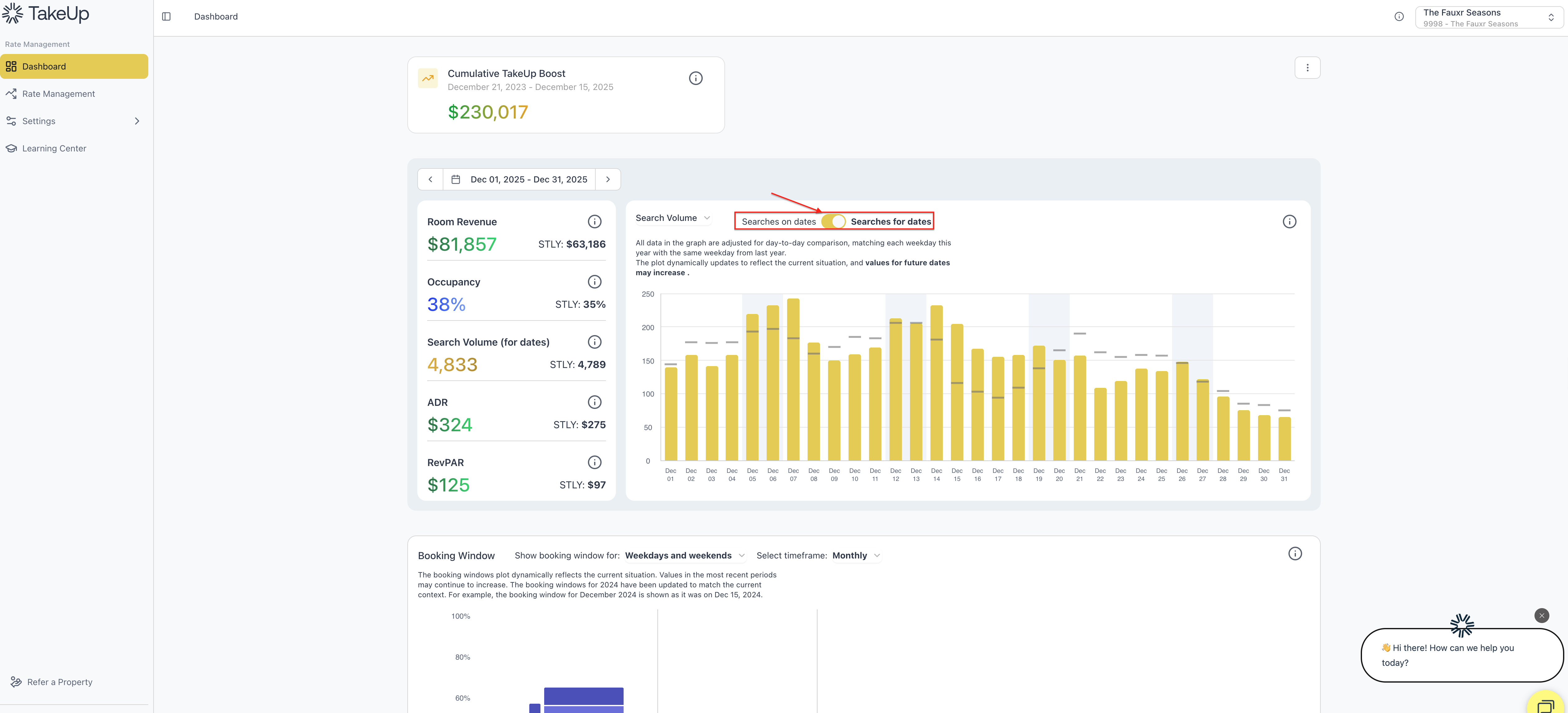
Searches for Dates
Shows how many travelers searched for each future stay date.
This view is especially helpful for:
-
Forecasting upcoming demand
-
Identifying which nights are attracting interest before bookings arrive
Searches on Dates
Shows how many travelers used your booking engine on each calendar day.
This view helps you:
-
Understand overall browsing activity
-
Spot surges in same-day or near-term interest
You can switch between these views at any time using the toggle above the chart.
Reading the Search Volume Chart
-
Golden bars represent the level of search activity
-
Taller bars indicate stronger interest
-
Shorter bars suggest softer browsing activity
-
Weekend shading helps highlight typical leisure travel patterns
Together, these elements make it easy to spot trends and shifts in demand.
Same Time Last Year (STLY) Data
Once your property has been live on TakeUp for a full year, you’ll see Same Time Last Year (STLY) search volume displayed in soft gray.
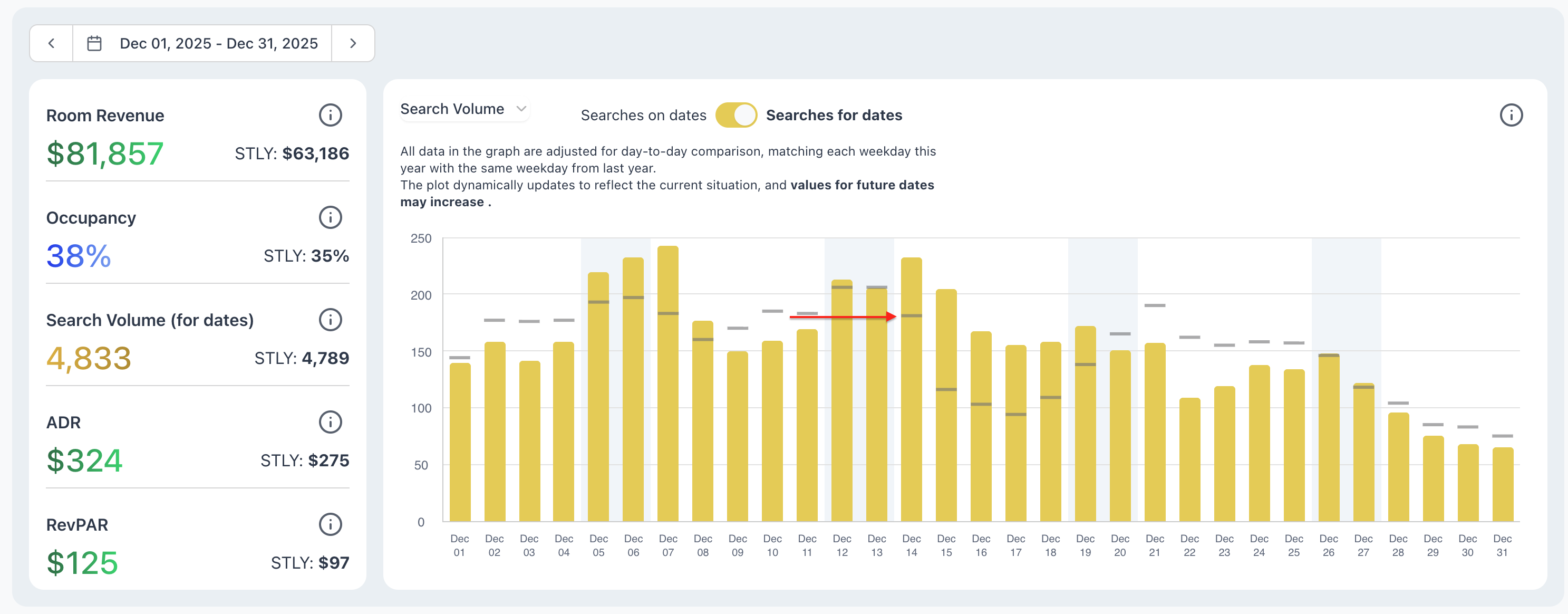
If you’ve been live for fewer than 12 months, you may see STLY: No data. This simply means TakeUp is still building your historical demand profile.
After your first year, STLY data provides a helpful reference point for understanding how current interest compares to past patterns.
What Search Volume Can Tell You
Search Volume helps surface demand signals well before bookings arrive.
It can help you understand:
-
Whether travelers are showing early interest
-
If demand is building faster or slower than last year
-
Whether weekends or holidays are gaining traction
-
If a sudden spike may be driven by an event, weather change, or media exposure
-
When overall market interest may be softening
Because this data comes directly from your booking engine, it reflects genuine guest intent specific to your property.
How You Can Use Search Volume
When search volume rises ahead of reservations
-
Interest is building
-
You may consider holding firmer pricing or tightening bounds
When search volume softens
-
Fewer travelers may be actively shopping
-
You may want to review comps or ease deltas
When search volume is higher than last year
-
Demand may be shaping up stronger than usual
-
You can often hold your rate position with confidence
When search volume is lower than last year
-
Pickup may be slower
-
Adjusting strategy earlier can help avoid last-minute changes
When search volume spikes suddenly
-
This often points to an event, weather shift, or increased visibility
-
Pricing may begin adjusting in response to the trend
Search Volume works best as an early signal, helping you anticipate changes before they appear in bookings.
Searches for Dates vs. Searches on Dates
Both views provide valuable context, depending on what you’re monitoring:
Searches for Dates
-
A light forecasting view
-
Highlights future stay interest
-
Useful for preparing pricing, staffing, and strategy
Searches on Dates
-
Shows overall website shopping activity
-
Helps you understand traveler behavior
-
Useful for same-day or near-term adjustments
Using both together gives you a clearer picture of what guests are interested in—and when.