![Symbol_transparent_black.png]](https://help.takeup.ai/hs-fs/hubfs/Symbol_transparent_black.png?height=50&name=Symbol_transparent_black.png)
Pace Health shows how your room revenue is building over time for a future month or a specific stay date, and whether that pace is healthy given current market conditions.
It helps you:
- See demand earlier
- Understand whether your pace is strong, normal, or softer than expected
- Make calmer, more confident pricing decisions
Instead of waiting until arrival week to understand performance, Pace Health gives you visibility months in advance.
You can think of it as a clear, forward-looking view of whether your revenue is Ahead, On Track, or Under Watch—and how that status is expected to evolve if current trends continue.
Pace Health also helps you understand how pricing decisions are performing by comparing your actual revenue to an estimated market baseline.
Why Pace Health Matters
Pace Health helps answer common questions you may have as you monitor performance:
- Are bookings arriving fast enough for this month or date?
- Is demand stronger or softer than expected?
- How does this compare to last year?
- Is current pricing capturing the available demand?
- Should we stay steady or take a closer look?
By showing how revenue is building over time—not just the final result—Pace Health helps you spot changes earlier and reduces the need for last-minute reactions.
Where to Find Pace Health
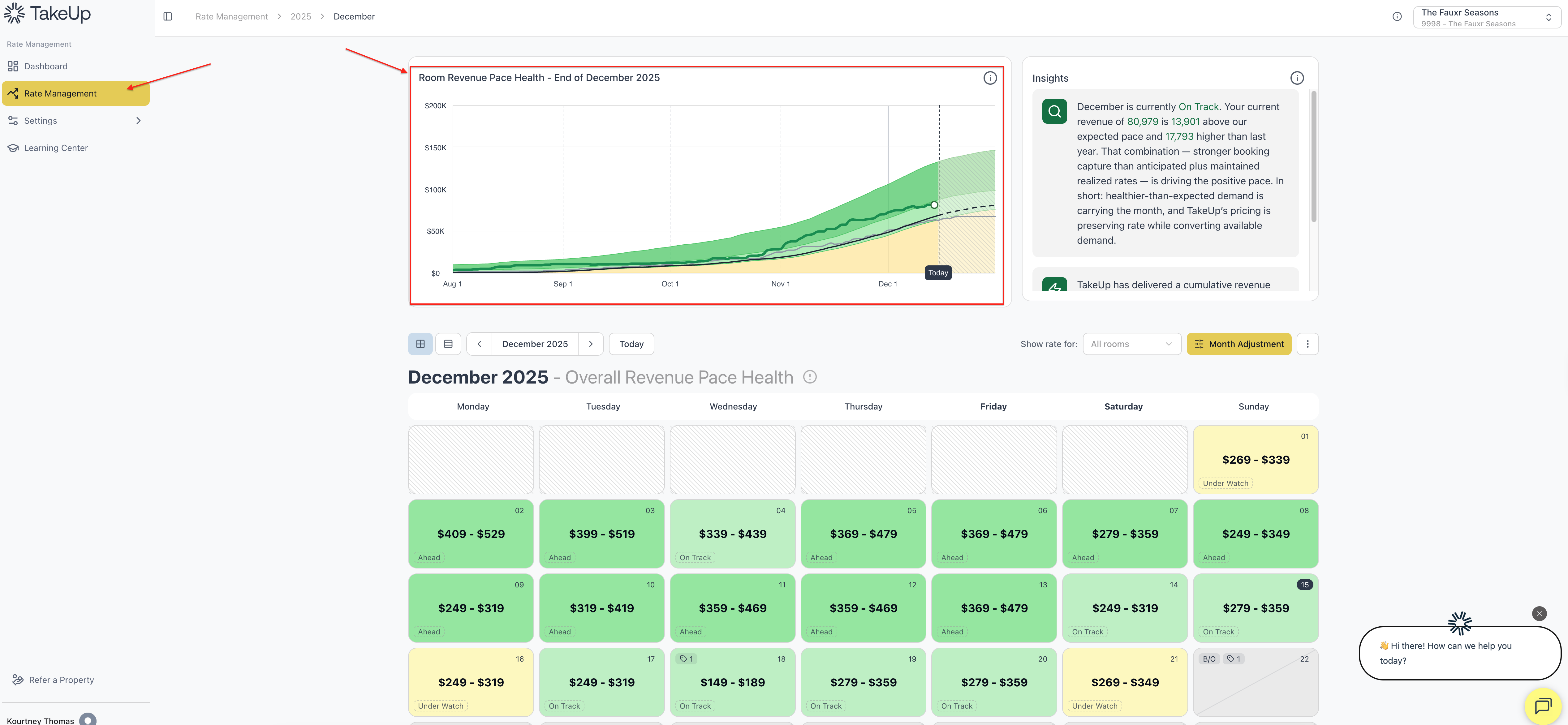
You can find your Room Revenue Pace Health Chart by navigating to Rate Management in the left-hand menu of the TakeUp web app.
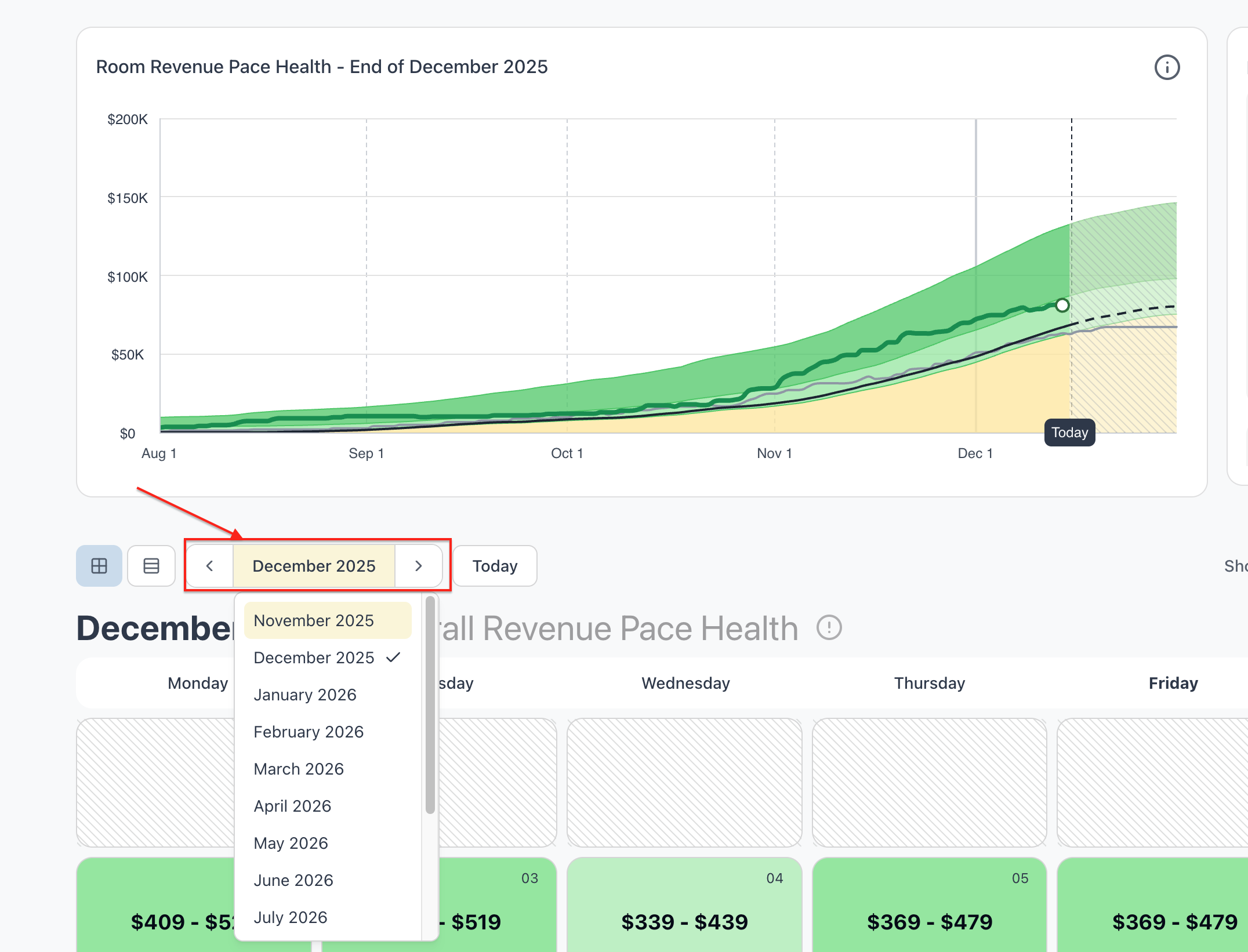
You can view your Room Revenue Pace Health Chart one month previous by using the arrow to the left of th emonth, or select future months with the forward arrow.
You can also look to future months by clicking on the Month and selecting a specific month.
How Pace Health Is Calculated
Pace Health uses three revenue lines to show how your performance compares to expectations.
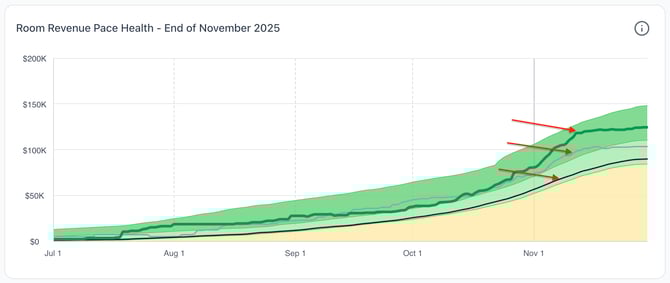
Room Revenue Pace (green line)
Your actual room revenue as it builds day by day as bookings are picked up.
Market Baseline Pace (black line)
An estimate of how your property would be pacing without TakeUp pricing applied, given current market conditions.
This baseline reflects typical travel behavior, seasonality, booking windows, and expected pricing patterns. It represents an expected market pace, not a target or guarantee.
Last Year’s Revenue (gray line)
Your matched-weekday revenue curve from the same time last year, provided as a reference point for comparison.
Because every year is different, last year’s performance should be used as general context rather than a benchmark to hit.
Pace Health Zones (Background Shading)
The background shading of the chart shows how your revenue pace compares to the expected market capture.
Ahead zone (dark green)
- Revenue is pacing ahead of expectations, indicating stronger-than-anticipated demand.
- In these conditions, pricing can often be held or strengthened to take advantage of demand.
On Track zone (light green)
- Revenue is pacing in line with expectations for the selected month or date.
- Pricing remains balanced, maintaining a steady approach.
Under Watch zone (yellow)
- Revenue is pacing below expectations, which may indicate softer demand.
- Pricing becomes more conservative, focusing on rates that are less sensitive to demand changes.
Dashed shading represents future predictions based on current booking trends.
This makes it easy to understand your pace health at a glance.
Monthly Pace Health
Monthly Pace Health shows how a selected month’s revenue is building over time.
Because guests often book well in advance, the chart includes revenue activity from up to four months before the stay month, giving a more complete picture of the month’s revenue curve—not just last-minute pickup.

When you hover over the chart and drag your cursor, you’ll see:
- Your actual revenue pace
- The market baseline pace
- Last year’s revenue
- A clear status label: Ahead, On Track, or Under Watch
The white dot at the end of the line is your revenue pace through yesterday.
How to Read Monthly Pace Health
When the green line is above the black line
- Demand is stronger than expected
- Revenue is pacing ahead of the market baseline
- Pricing can typically be held or adjusted upward with confidence
When the green line aligns with the black line
- Revenue is pacing normally
- Pricing strategy is stable and healthy
When the green line falls below the black line
- Demand is softer than expected
- Pricing adjusts conservatively to support pickup
- You may want to review competition, search trends, or event coverage
The monthly view is best used as a big-picture health check.
Daily Pace Health
Each individual occupancy date has its own Room Revenue Pace Health chart. You can view a specific day’s Pace Health by clicking on that day in the calendar below the monthly chart.
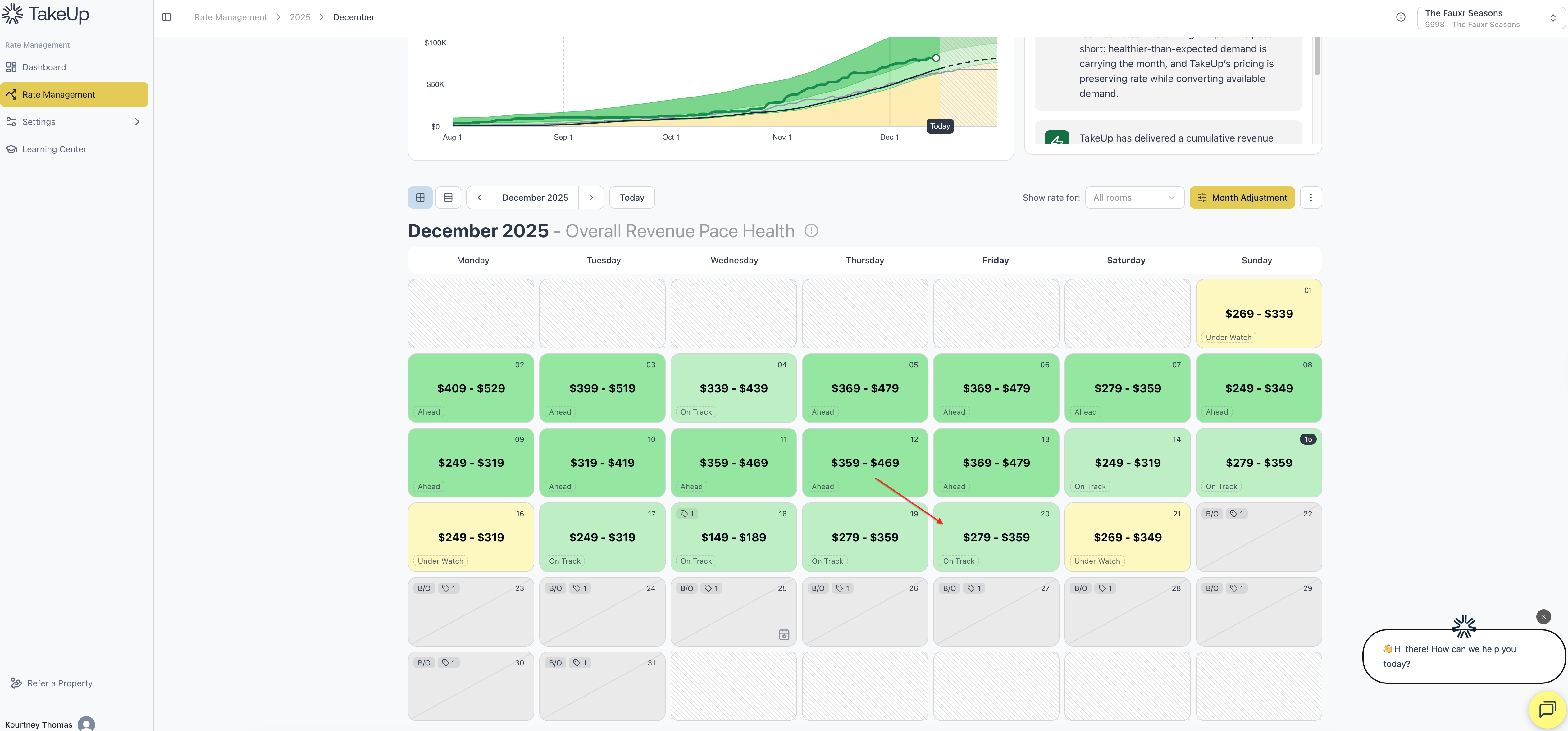
Daily Pace Health focuses on a single stay date, showing how revenue for that night is building across the booking window.
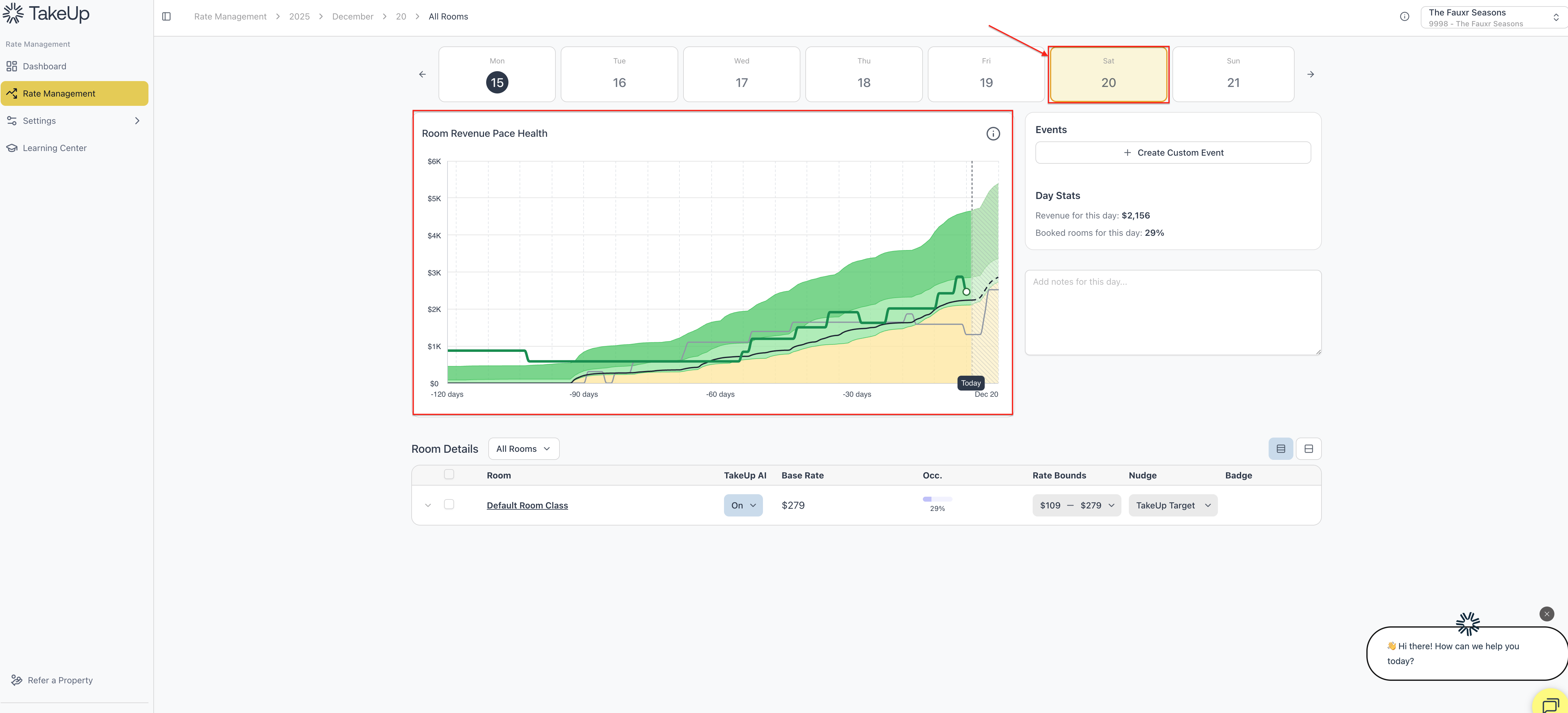
It uses the same three lines:
- Green — actual revenue pace
- Black — market baseline pace
- Gray — last year
The zone shading follows the same meaning:
- Green = Ahead
- Light green = On Track
- Yellow = Under Watch
The right-hand panel also includes:
- Written daily insights
- Day-level stats (revenue and rooms booked)
- Recent pricing adjustments
- The ability to add custom events
How to Read Daily Pace Health
When a date is Ahead
- Demand is strong for that night
- Pricing can generally be maintained or strengthened
When a date is On Track
- Demand is typical for this point in the booking window
When a date is Under Watch
- Demand is softer than expected
- Pricing becomes more conservative
- You may want to review comps, search activity, or missing events
When a date changes zones over time
- This reflects real shifts in demand
- Under Watch → On Track → Ahead suggests strengthening pickup
- Ahead → Under Watch may indicate slowing demand
Daily Pace Health helps you manage important dates individually, with context.
Using Monthly and Daily Pace Together
- Monthly Pace Health shows overall momentum
- Daily Pace Health highlights which dates are driving that momentum
Together, they help you:
- Understand demand earlier
- Explain performance more clearly
- Support pricing decisions with confidence
- Recognize the impact of events and market shifts
- See how pricing is performing relative to expected market behavior
Pace Health provides a clear, early view of how your revenue is shaping up—and reassurance that pricing is responding appropriately as conditions change.